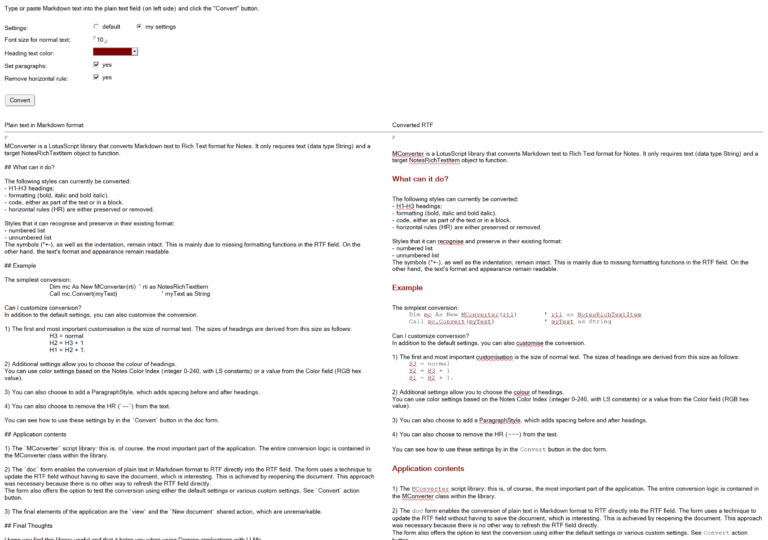
MConverter is a LotusScript library that converts Markdown text to Rich Text format for Notes. . It is likely to be most useful for converting AI outputs into a more visually appealing format. It only requires text (data type String) and a target NotesRichTextItem object to function.
What can it do?
The following styles can currently be converted:
- H1–H3 headings;
- formatting (bold, italic and bold italic).
- code, either as part of the text or in a block.
- horizontal rules (HR) are either preserved or removed.
Styles that it can recognize and preserve in their existing format:
- numbered list
- unnumbered list
The symbols (*+-), as well as the indentation, remain intact. This is mainly due to missing formatting functions
in the RTF field. On the other hand, the text’s format and appearance remain readable.
Example
The simplest conversion:
Dim mc As New MConverter(rti)     ' rti as NotesRichTextItem
Call mc.Convert(myText)           ' myText as String
Can I customize conversion?
In addition to the default settings, you can also customize the conversion.
1) The first and most important customization is the size of normal text. The sizes of headings are derived from
this size as follows:
H3 = normal
H2 = H3 + 1
H1 = H2 + 1
2) Additional settings allow you to choose the colour of headings.
You can use color settings based on the Notes Color Index (integer 0-240, with LS constants) or a value from
the Color field (RGB hex value).
3) You can also choose to add a ParagraphStyle, which adds spacing before and after headings.
4) You can also choose to remove the HR (—) from the text.
You can see how to use these settings by in the Convert button in the doc form.
Application contents
1) The MConverter script library: this is, of course, the most important part of the application. The entire
conversion logic is contained in the MConverter class within the library.
2) The doc form enables the conversion of plain text in Markdown format to RTF directly into the RTF field.
The form uses a technique to update the RTF field without having to save the document, which is interesting.
This is achieved by reopening the document. This approach was necessary because there is no other way to
refresh the RTF field directly.
The form also offers the option to test the conversion using either the default settings or various custom
settings. See Convert action button.
3) The final elements of the application are the view and the New document shared action, which are
unremarkable.
Final Thoughts
hope you find this library useful and that it helps you when using Domino applications with LLMs.
Suggestions and feedback are welcome.
Released 2026 under Apache License 2.0 in OpenNTF